

- How were reports created before?
- What did the system need to do?
- Why a WordPress plugin and not SaaS?
- Data model: 8 tables instead of CPT soup
- Guest access for external staff
- PDF generation with letterhead stamping
- On-site capture: images with comments
- Project numbering & cloud backup
- Numbers & architecture
- When is a custom plugin worth it?
- Frequently Asked Questions
A custom WordPress plugin replaces a stack of Word templates: a pile of report templates with corporate letterhead becomes a dedicated project management tool with guest access for staff, on-site capture in the browser, and automated PDF generation – complete with stamped-on company letterhead.
I built exactly this for an ecological consultancy. The office produces species-protection reports – field surveys, FFH pre-checks, relocation protocols, monitoring daily protocols. Before the plugin, the workflow looked like this: staff were out in the field during the day, made handwritten notes and took photos, and in the evening typed everything up at the office, opened a Word template, hopefully didn't forget the letterhead, and finally emailed out a PDF. Today a staff member opens the URL on their phone via a guest link, fills in the form right on site, uploads images with comments and orientation – and the office manager approves with a single click at the end.
In this article I'll walk through how the workflow works technically: the data model, the guest-access logic, the PDF engine with letterhead stamping – and why a WordPress plugin made more sense for this setup than any SaaS solution.
How were species protection reports created before?
The old world consisted of nine specialised Word and PDF templates, all with corporate letterhead, all with their own mandatory fields. Daily protocols for field surveys, templates for FFH pre-checks, relevance-check species protocols, mapping appointments, monitoring daily protocols, relocation reports – every template had its own layout, its own tables, its own required information.
The workflow looked like this: on-site survey with notepad and camera, then typed up at the office in the evening. The Word template was copied from a previous project, half-heartedly reset, manually filled in. Images were sitting somewhere on OneDrive, had to be searched for, sorted, and dragged into the document. Case numbers were assigned manually – with the classic risk that the next number was already taken or had a gap.
Reports were sent by email with the PDF as an attachment. The final version landed in a project folder, and a copy went more or less reliably into a backup folder. When a staff member was sick or had moved on, finding the latest reports was like an Easter egg hunt.
Wrong letterhead, forgotten case number, duplicate sequence number, mixed-up images, an old template version from last year – every spot where a human enters something manually is a spot where something can go wrong.
What did the system need to do?
The plugin had to map the nine report types cleanly, have a clear status per report (draft vs. completed), and let external staff into the system – without having to create WordPress accounts for them. On top of that came consistent letterhead on all PDFs, automatic case-number assignment per project, and a cloud backup in case the WordPress installation ever fails.
- 9 specialised report types with individual PDF layouts
- Project hierarchy: Customer → Project → Reports
- Guest access for external staff without a WordPress account
- On-site capture in the browser (phone, tablet, laptop)
- Images with comments and orientation per observation
- Consistent corporate letterhead on all PDFs
- Automatic case-number assignment per project
- Cloud backup of finalised reports
It was also important that the office could run the system itself. No vendor dependency, no monthly licence fees per user, no data-export clauses in some terms-of-service fine print. The data belongs to the office – that was a given from the start.
Why a WordPress plugin and not a SaaS solution?
Three reasons spoke against a SaaS solution like Jotform Enterprise, Formstack Documents, or 123FormBuilder:
First: the existing WordPress stack. Hosting, backup, user management, SSL, updates – that's all been running for years. A SaaS solution on top would have meant a second stack with its own data maintenance, its own logins, its own audit logs.
Second: the domain-specific fields. Species codes, protected-area codes, breeding-suspicion categories, intervention areas – these are data structures that no generic form builder maps out of the box. In SaaS you'd have to rebuild every field individually, often without proper validation. With a custom plugin, the lists are fed from an imported arten_import.csv, supplemented with proprietary master data.
Third: data sovereignty. Species protection reports contain location data of endangered species, client information, sometimes intervention plans for sensitive construction projects. With the plugin, this data never leaves the office's own server – except as an encrypted backup to a controlled cloud instance (LuckyCloud on Seafile).
| Criterion | SaaS (Jotform/Formstack) | Custom plugin |
|---|---|---|
| Setup costs | Low | One-off four-figure |
| Running costs | ~€3,000–10,000/year | Hosting + maintenance |
| Domain fields | Generic | Tailored |
| Data sovereignty | With the vendor | On own server |
| Customisation | Limited | Full |
| Exit | Data-export effort | Data belongs to office |
Data model: 8 tables instead of CPT soup
With WordPress plugins, the temptation is great to solve everything via Custom Post Types and postmeta. For this plugin I deliberately took the other route: eight dedicated MySQL tables, cleanly created via dbDelta on activation.
The reason: cleanly modelling relationships. A project has n staff members, m report templates, k report instances, each instance has j images and zero or one guest access. With postmeta, that quickly turns into an N+1 query massacre. With dedicated tables, those are clean JOINs with indexes – and the DB schema is understandable at a glance.
fm_projects– project with customer data and case numberfm_project_users– staff assignment (n:m)fm_form_templates– the 9 report types with field structure (JSON)fm_project_forms– which report belongs to which projectfm_form_instances– concrete fill-ins (status: draft / completed)fm_form_images– images with comments and orientationfm_form_guest_access– token + password + status per instancefm_settings– global plugin settings
The workflow from the initial assignment to the sent PDF runs entirely through these eight tables. No post-type tangle, no hidden performance traps.
Guest access for external staff
The plugin's core feature: staff can fill in reports without having a WordPress account. Useful for seasonal workers, freelancers, or interns brought in at short notice. Technically it's a token-plus-password system with a controlled lifecycle.
Per report instance, exactly one guest access is created: a 40-character random token (via wp_generate_password(40, false, false)) and a password assigned by the manager. Both are stored in fm_form_guest_access – the password as a wp_hash_password hash, the token in plain text (it replaces the username).
// Create guest access for a report instance
public function create_for_instance($instance_id, $password, $created_by = 0) {
    global $wpdb;
    $instance = $wpdb->get_row($wpdb->prepare(
        "SELECT id, status FROM {$this->instances_table} WHERE id = %d",
        $instance_id), ARRAY_A);

    // Only drafts can get a guest access
    if (!$instance || $instance['status'] !== 'entwurf') return false;

    $token         = wp_generate_password(40, false, false);
    $password_hash = wp_hash_password($password);

    // One active access per instance
    $wpdb->delete($this->table, ['instance_id' => $instance_id], ['%d']);
    $wpdb->insert($this->table, [
        'instance_id'   => $instance_id,
        'access_token'  => $token,
        'password_hash' => $password_hash,
        'status'        => 'active',
        'created_by'    => (int) $created_by,
    ]);
    return ['instance_id' => $instance_id, 'access_token' => $token];
}
After creation, the manager gets the URL and the password and sends both to the staff member externally – via email, Signal, whatever they prefer. The URL has the format ?fm_project_slug=…&fm_guest_token=…. On request, the plugin checks token plus password and only then grants access to exactly that one instance. No project list, no other reports, no access to completed reports.
The most elegant part of the solution is the self-revoking mechanism: as soon as the report is completed, the guest access is automatically deleted. No cron job searching for expiry dates. No forgotten tokens that stay valid for months. The guest access lives exactly as long as it's needed – and not a day longer.
On form completion, the corresponding guest access is deleted in the same transaction. No background process, no TTL counter, no forgotten tokens. The lifecycle is coupled to domain logic, not a timer.
PDF generation with letterhead stamping
The PDF engine is by far the largest chunk in the plugin: class-fm-pdf.php with nearly 5,000 lines. No Twig, no Blade – pure PHP-HTML with a dedicated build triad per report type: is_*_protocol(), build_*_definition(), render_*_intro(). It's not pretty, but it cleanly maps the nine different layouts and stays readable when debugging.
Under the hood, Dompdf handles the HTML-to-PDF conversion. Multi-page reports are controlled via CSS @page rules: header and footer as @page { @top-center { … } @bottom-center { … } }, continuous page numbering via counter(page).
The trick with the corporate letterhead: instead of rebuilding the layout in CSS (which with logos, watermarks, and fonts is always a source of inconsistencies), the existing PDF letterhead is stamped over each page of the Dompdf output via FPDI. The letterhead PDF comes from the design team, and the plugin just has to overlay it correctly – pixel-perfect, with all the typefaces, colour profiles, and margins the print shop dictated.
// Generate PDF and store it
public function generate($save_to_file = false) {
    if (!$save_to_file) return $this->generate_html(true);

    $loader = new FM_DomPDF_Loader();
    $html   = $this->generate_html_for_dompdf();
    $result = $loader->generate_pdf($html, $this->build_filename());
    if (!$result['success']) return false;

    $upload_dir = wp_upload_dir();
    $temp_dir   = $upload_dir['basedir'] . '/fm-temp/';
    if (!file_exists($temp_dir)) wp_mkdir_p($temp_dir);

    // Time prefix prevents filename collisions + makes brute-force URLs harder
    $filepath = $temp_dir . time() . '_' . $this->build_filename();
    file_put_contents($filepath, $result['pdf']);
    return $filepath;
}
The finished PDFs sit in wp-uploads/fm-temp/ with a time prefix in the filename. Delivery doesn't go through direct URLs to the file but through a template_redirect hook that first checks permission and then streams the file – a classic "routed download".
On-site capture: images with comments and orientation
The actual efficiency gain happens out in the field. Staff open the guest link on their phone, enter observations directly during the survey, and upload photos. Per image, the plugin doesn't just store the file itself but also a comment ("breeding suspicion great spotted woodpecker in old oak") and an orientation ("looking south").
In the browser everything runs over AJAX: when the staff member types into the form, the in-progress state is autosaved as JSON in the instance's data_json. When they upload an image, the file upload goes to a nopriv AJAX endpoint that re-checks the token on every call. Server-side, every input field is recursively cleaned with sanitize_form_value(), plus check_ajax_referer as nonce protection on every endpoint.
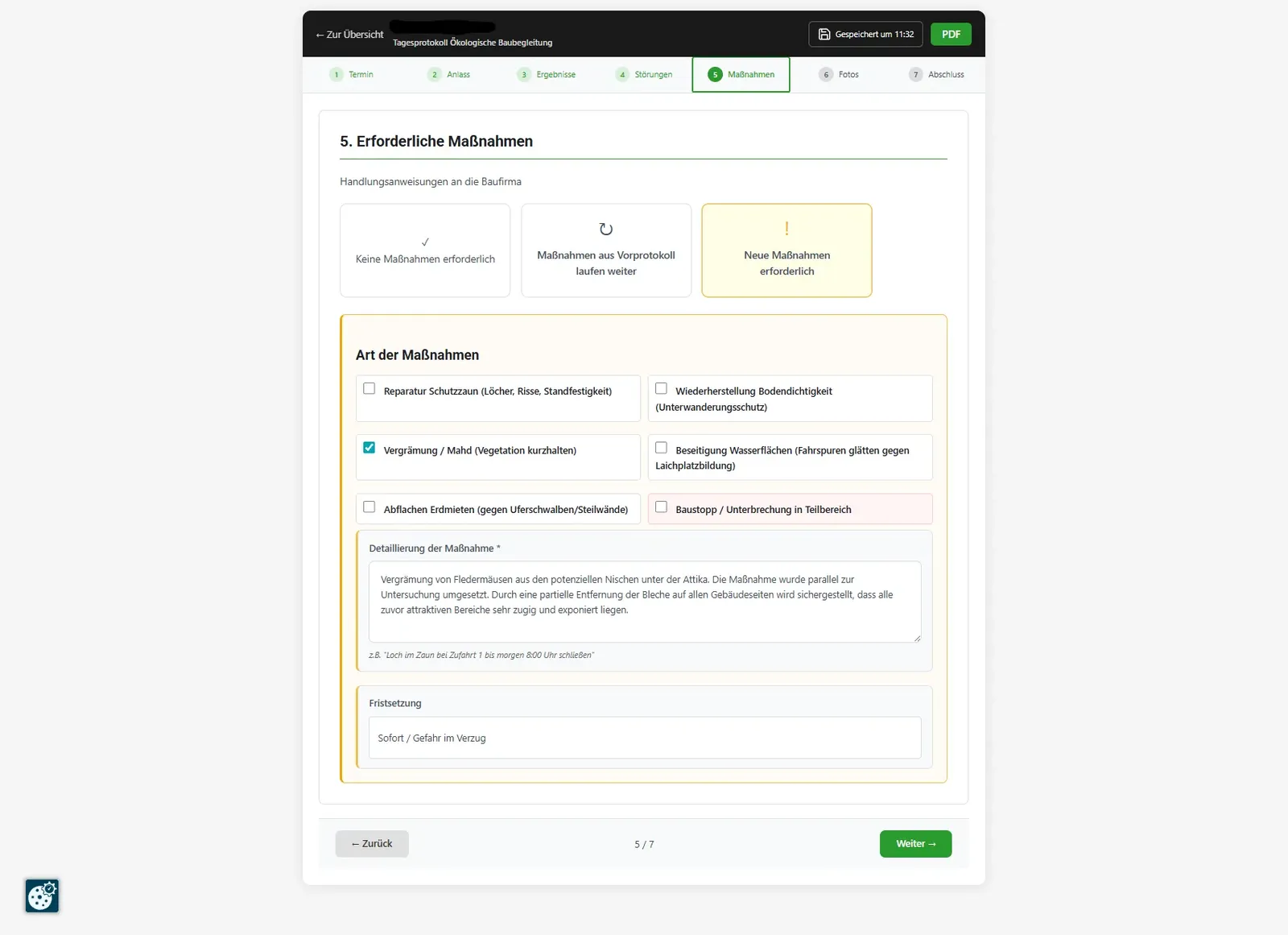
In the final PDF, all uploaded images appear as a photo appendix with captions. What used to be two hours of typing up at the office (finding images, sorting them, typing captions) now happens during the survey itself.
Project numbering & cloud backup
Case numbers are sacred in the consultancy world. Every report needs a unique, sequential number per project – with the same logic as in the old Word days. The plugin solves this with a central function fm_get_instance_project_number(), producing the format type_index.sequence: 3.07 means "third report type in the project, seventh instance of it".
The key here: the function is central. There isn't custom numbering logic in every view. If the numbering rule changes, it changes in one place. I'd tried this differently before – every view had its own get_number() method – and ended up with two different numbers for the same report depending on whether you saw it in the overview or in the PDF.
For cloud backup the plugin uses the LuckyCloud API – LuckyCloud runs on Seafile, an open-source cloud storage solution with OAuth-token authentication. Per project, a dedicated cloud folder is created, and completed PDFs are automatically uploaded there. The API token is cached via set_transient (one-week TTL); new tokens are fetched transparently when they expire.
Numbers & architecture
A few key figures to gauge the plugin's size:
- 9 specialised report types with individual PDF layouts
- 8 custom MySQL tables
- 35+ AJAX endpoints (both
wp_ajax_*andwp_ajax_nopriv_*) - Composer packages: Dompdf, FPDF, FPDI
- ~22,000 lines of PHP total
| Plugin area | Lines of code | Responsibility |
|---|---|---|
| includes/ | ~9,200 | Domain classes (PDF, Project, Guest Access, Email, Cloud, Species) |
| public/ | ~5,000 | Frontend controller + form views + AJAX |
| admin/ | ~3,700 | Backend views (projects, forms, settings) |
| Bootstrap | ~2,800 | Plugin setup, hooks, routing |
By far the biggest chunk in a single file is class-fm-pdf.php at almost 5,000 lines. That's normally a code smell – but with nine different report layouts each having their own build methods, the split is less obvious than it sounds. A sensible refactoring direction would be to pull each report type into its own renderer class. It worked the way it is – that mattered more here than architectural elegance.
When is a custom plugin worth it?
A custom WordPress plugin isn't the right answer in every case. For a standard contact form, WPForms or Gravity Forms would be quicker to set up. For a handful of PDF templates, Formstack Documents is often enough.
Custom development becomes worthwhile in this constellation:
- More than 5–10 different report layouts with individual mandatory fields
- Domain-specific data structures that no generic form builder maps cleanly
- External or seasonal staff who need access without a WordPress account
- An existing WordPress stack the plugin slots into seamlessly
- GDPR requirements or data-sovereignty needs that demand on-premise storage
- SaaS costs that would total €5,000–15,000 over multiple years
The break-even versus a SaaS alternative for this kind of setup is typically 18–24 months. After that, the plugin pays for itself month by month – and the office has full code access plus the ability to adjust at any time, without waiting for someone else's roadmap.
A custom plugin needs maintenance – updates for PHP versions, security patches, occasional adjustments when WordPress or underlying plugins change. On average that's 2–6 hours per quarter. Anyone who can't budget for that should lean towards a SaaS solution.
Frequently Asked Questions about Digitising Report Workflows
How does on-site report capture work without WordPress accounts?
Through guest access. The plugin generates a 40-character token plus a manager-defined password per report. Staff open the URL on their phone, enter the password, and can fill in the form, upload images and add comments – all without a WordPress user account.
Which PDF library generates the reports with company letterhead?
Dompdf produces the HTML-to-PDF, and FPDI then stamps the existing letterhead PDF onto every page. This keeps corporate design consistent and avoids rebuilding the layout in CSS. Multi-page reports with headers and footers are controlled via CSS @page rules.
Is token-and-password guest access secure enough?
For internal staff with a controlled distribution circle, yes. Each form has exactly one active access link that is automatically revoked when the report is completed (self-revoking). AJAX endpoints validate the token on every call. For higher requirements, token TTL, audit log, and 2FA can be added.
How many report types make sense in a single plugin?
In this case it's nine specialised templates – from daily protocols and field surveys to FFH pre-checks and monitoring. Each report type has its own PDF layout with letterhead, but all share the project management, image handling, and guest access. With more than 10–15 types, I'd switch to a schema-driven form builder.
What does a SaaS alternative like Jotform or Formstack cost?
Realistically €3,000–10,000 per year for a setup with document generation, project hierarchy, and guest access. Jotform Enterprise starts in the low four-figure annual range, Formstack Documents plus Forms quickly adds up to five-figure yearly costs. The domain-specific workflow (case numbers, letterhead, specialist fields) would still need to be rebuilt there.
When is a custom WordPress plugin worth it over a SaaS solution?
When an existing WordPress stack is in place, the workflows are domain-specific, external staff need access without WordPress accounts, and data must stay on-premise. With more than 5–10 individual report layouts, the one-off plugin development typically pays for itself within 18–24 months – including full code ownership and freedom to adapt.
Digitising your own reports?
Planning a similar digitisation of forms or reports – with guest access, PDF generation, or cloud backup? Drop me a line and I'll take a look at your workflow.
Contact